I've spent 15 years in events, marketing, and media. I built SpeakerStacks because I was tired of leaving leads on the table after every talk at event event. This update brings us closer to what I always wanted it to be - a proper tool that works as hard as you do.
If you have questions or feedback, just send me an email. I read everything.
— Adam Parry, Founder
1. Mobile App: Tap to Install
No app store. No download. Just open SpeakerStacks on your phone, tap "Install", and it's on your home screen in seconds.
We rebuilt SpeakerStacks from the ground up to work like a native mobile app. It's fast, it's smooth, and yes - it works offline.
Install in 10 Seconds
Open SpeakerStacks on your phone
Tap the Install button (or "Add to Home Screen" on Safari)
Done. It's on your home screen.
Features:
Works Offline
Venue WiFi down? Phone signal patchy? Doesn't matter. Your leads and sessions are cached locally so you can access them anytime. View lead details, check session stats, and review your pipeline - no internet required.
Native Sharing
Tap share on any lead or session and send it directly to WhatsApp, Email, Slack, or any app on your phone. No more copying and pasting. One tap, done.
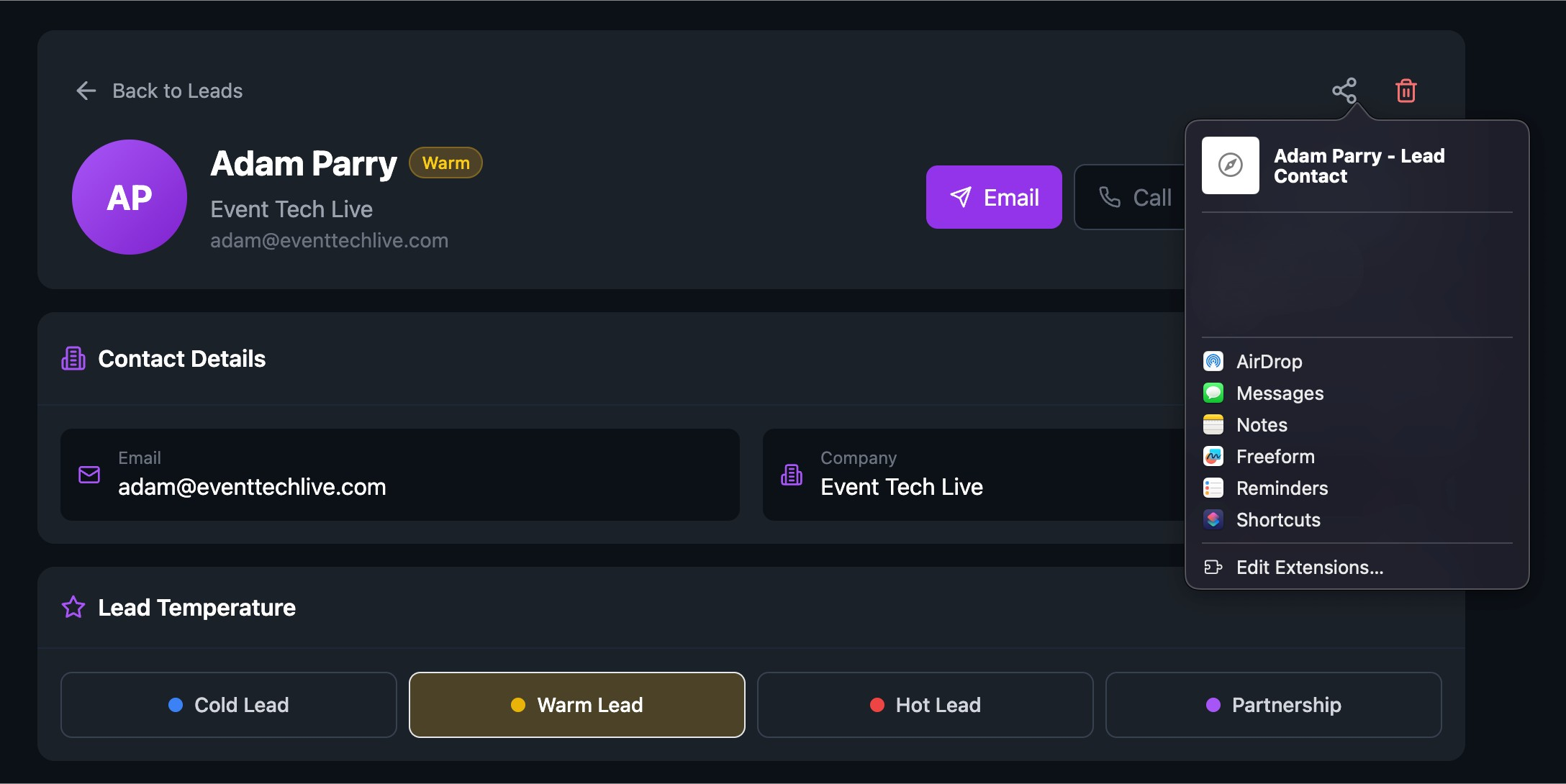
Pull to Refresh
Swipe down to refresh your data - just like any app you're used to. When you're back online, everything syncs automatically in the background.
2. Dashboard & Analytics: See Exactly What's Working (And What's Not)
Your dashboard now tells a complete story - from the moment someone lands on your page to the moment they book a meeting.
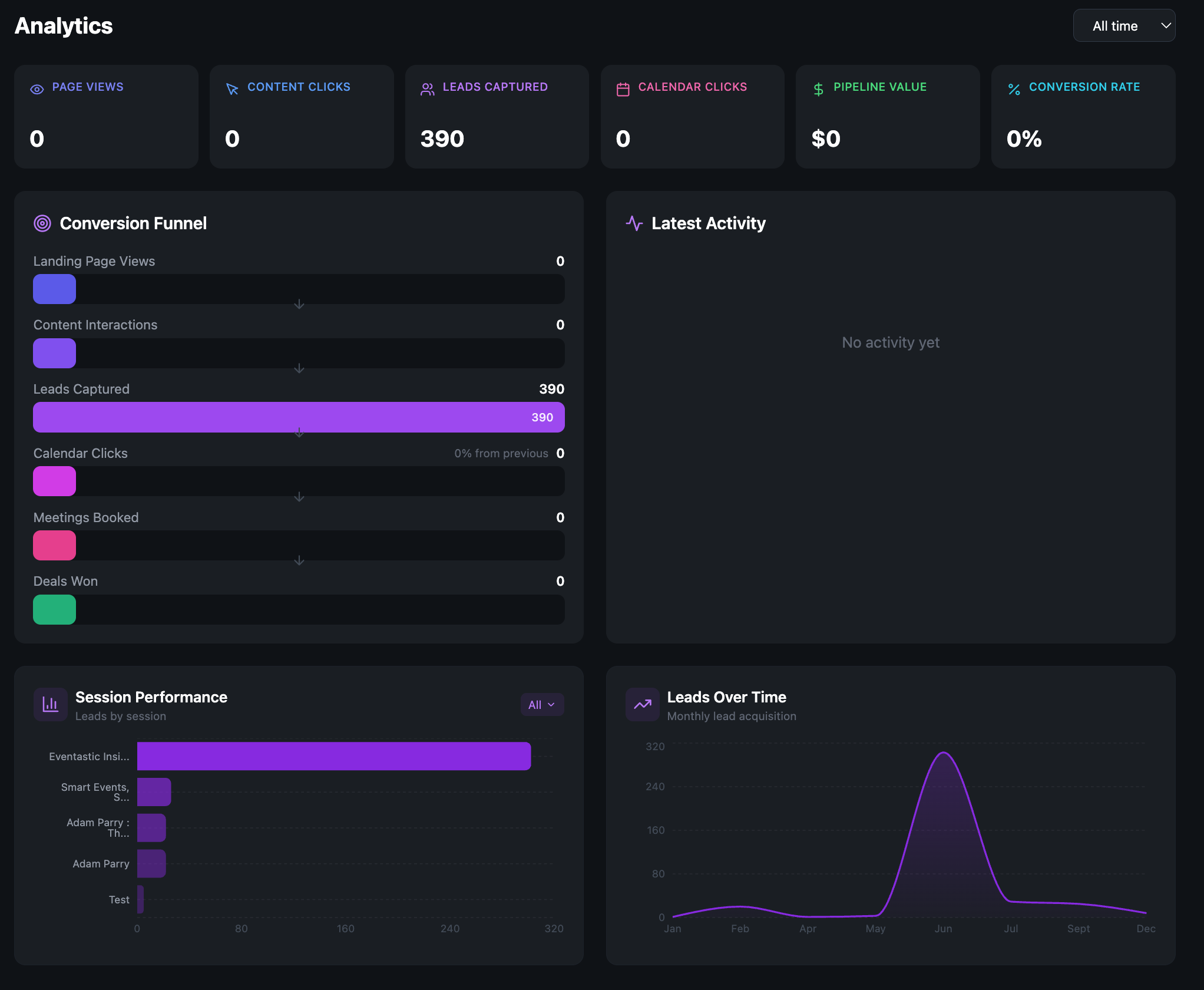
Conversion Funnel
Watch your audience move through each stage: Page Views → Content Clicks → Leads Captured → Calendar Clicks → Meetings Booked. Spot exactly where people drop off so you know what to fix.
Pipeline Value
See the total £/$ value of your pipeline at a glance. No more guessing whether your speaking is generating real business.
Conversion Rate
One number that tells you if your landing page is doing its job. Compare across sessions to see which events convert best.
Latest Activity Feed
Real-time feed showing exactly who's doing what, right now. See when someone views your content, clicks your calendar link, or re-engages with your session.
2. Lead Management: Know Who's Hot, Warm, and Cold
Every lead now comes with context. See their engagement history, spot the ones ready to buy, and take action in one tap.
Temperature Badges
Every lead is automatically tagged as Hot, Warm, or Cold based on their engagement. Stop treating all leads the same - prioritise the ones showing buying signals.
Engagement History
See exactly how each lead has interacted with your session:
How many times they viewed your page
Which content they clicked
Whether they clicked your calendar link
How many times they came back
Quick Actions
One tap to email, call, or save to contacts. No more copying and pasting into your phone. The vCard download even includes their company and notes.
Smarter Filters
Filter by temperature, session, date range, or meeting status. On mobile, filters collapse to save space and expand when you need them.
4. Sessions Creation: Faster, Without the Risk
We've made session creation smoother and safer. Auto-saving drafts, mobile preview, and (for Pro users) default settings that save you time on every new session.
Auto-Save Drafts
Close your browser by accident? Laptop dies? Your session draft is automatically saved locally. When you come back, we'll ask if you want to pick up where you left off.
No more losing 20 minutes of work because of a dodgy connection.
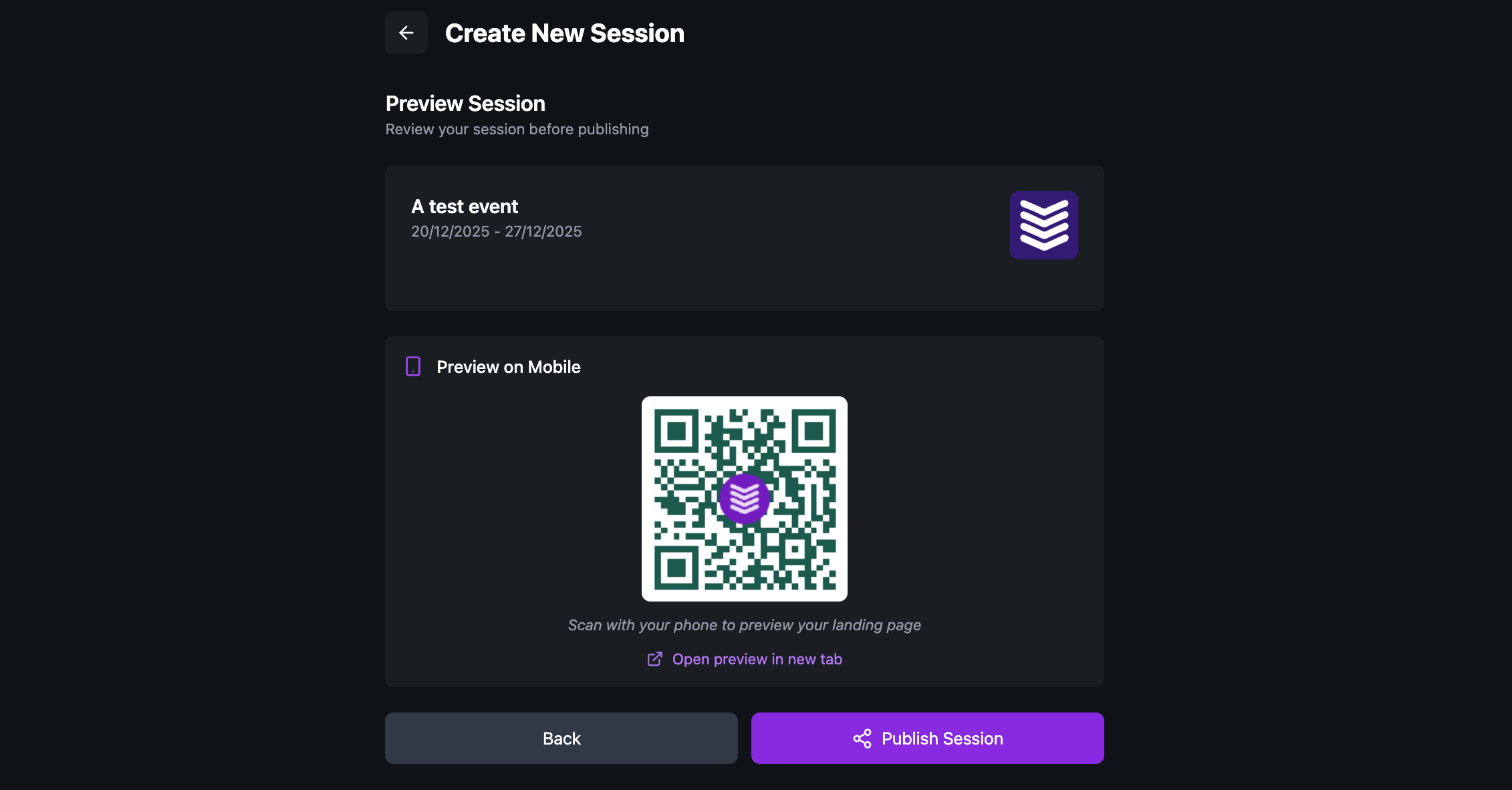
QR Code Preview
Before you go live, scan the QR code to preview exactly what your audience will see on their phones. Test it yourself before you're on stage.
Default Session Settings (Pro Tier)
Set your preferred session image, content access rules, calendar visibility, and lead capture settings once. Every new session automatically uses your defaults.
If you run similar sessions regularly, this saves serious time.
5. Prove Your Speaking ROI: With Actual Numbers
Speaking is an investment. Now you can prove the return. Our ROI Calculator now generates professional PDF reports you can share with sponsors, clients, or your leadership team.
What the report includes:
Executive Summary - Total leads, meetings booked, win rate, pipeline value
Cost Analysis - Cost per lead, cost per meeting, cost per acquisition
Break-Even Analysis - How many deals you need to cover your costs
Pipeline Projections - Expected revenue based on your conversion rates
Key Insights - Auto-generated recommendations based on your numbers
Designed for the boardroom
Clean, professional design with your event details and metrics laid out clearly. Dark theme matches SpeakerStacks branding. Print-ready or share as PDF.
Perfect for:
Sponsors asking "was it worth it?"
Your boss asking for ROI justification
Your own records to compare events
6. Pro Tier Features: Make SpeakerStacks Yours
Pro users get access to branding, tracking pixels, and default settings that make SpeakerStacks feel like an extension of your business.
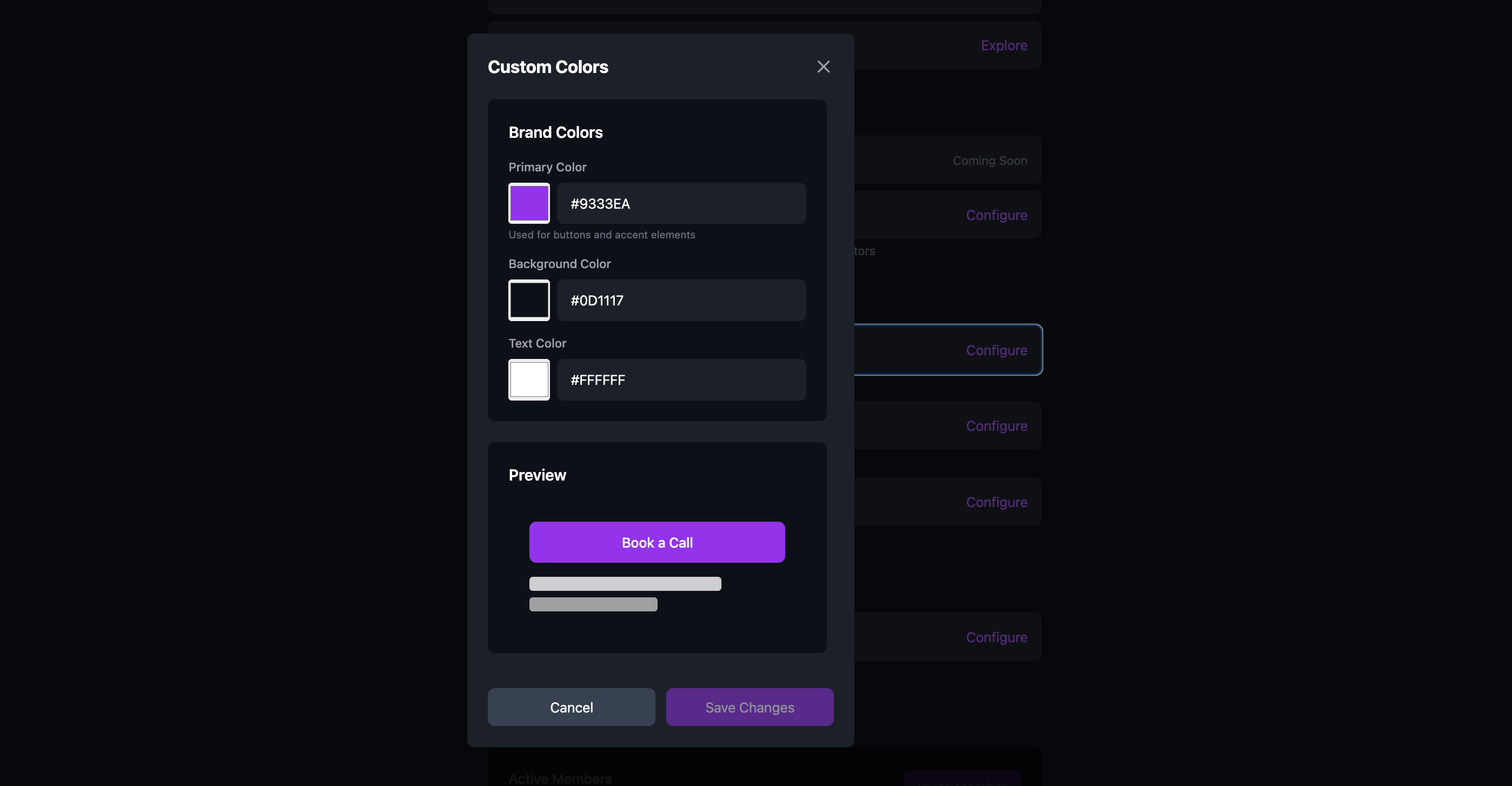
Custom Branding
Your landing pages should look like you, not us.
Set your primary colour, background colour, and text colour
Upload your logo
Customise your QR code colours and style
Your audience sees a seamless, branded experience from stage to inbox.
Tracking Pixels
Retarget your speaking audience across the web.
Add your pixel IDs and we'll fire them automatically on your landing pages and content pages:
Google Analytics 4 (GA4) - Track behaviour and conversions
Meta (Facebook) Pixel - Build custom audiences for retargeting
TikTok Pixel - Reach your audience on TikTok
LinkedIn Insight Tag - Retarget on LinkedIn (great for B2B speakers)
This means everyone who visits your session page can be added to your retargeting audiences - even if they don't submit a lead form. Powerful stuff.
Default Session Settings
Stop configuring the same settings every time.
Set your defaults once:
Session image
Content access rules (always available, one-time, expiry)
Calendar visibility
Lead capture settings (phone, star rating, extra question)
Every new session inherits your defaults. Change what you need, leave the rest.
Ready to Go Pro?
⏰ Heads up: SpeakerStacks Pro is increasing by 10% on January 1st.
SpeakerStacks Pro gives you:
✓ Custom branding (your colours, your logo)
✓ Tracking pixels (GA4, Meta, TikTok, LinkedIn)
✓ Default session settings
✓ Priority support
✓ Everything we ship next
If you're serious about using speaking to generate business, Pro pays for itself after one event.
Lock in the current price before it goes up., Upgrade to Pro Now
Ready to capture leads from your next talk?
SpeakerStacks helps you display QR codes, capture attendee information, and sync leads directly to your CRM. Get started free.
Want More Insights?
Subscribe to get proven lead generation strategies delivered to your inbox.
Subscribe to Newsletter